Reducing Agency Dependency With an In-House AI Design Stack
Teams cut agency costs 60-80% by rebuilding workflows around AI, not just adopting tools.
Reducing agency dependency starts with a question most teams get wrong: are they short on money, or short on speed? Agency retainers for small and mid-sized businesses run $5,000 to $15,000 a month, and for that spend, most teams get an account manager, a bi-weekly check-in, and a report that appears two weeks after the month already ended. That's not a cost problem so much as a pace problem. Go-to-market teams need a social post, a one-pager, or a deck in a matter of hours, and agencies were never built to move that fast. This piece lays out how to build an in-house AI design stack, the governance it needs, and the workflows that let non-designers produce brand-consistent work at agency quality and in-house speed.
Three things need separating before going further, because most teams compare invoices instead of comparing what they're actually missing. A subscription buys throughput. An agency buys judgment. An in-house team buys continuity. Picking the wrong one usually comes down to solving a speed problem with a headcount fix, or a judgment gap with a software subscription.
What the market shift looks like for teams doing this now
The numbers on adoption are no longer in question. Research and Markets data cited by Flatline Agency shows generative AI in creative industries is set to grow from $4.06 billion in 2025 to $5.38 billion in 2026, a 32.3% jump in a single year. Marketer adoption tells the same story: 91% now use AI in their work, up from 63% just a year before. Among web designers specifically, recent research shows 93% already use AI in some part of their design work, and 57% expect it to become essential to the job soon.
So adoption isn't the gap. The gap is visible further downstream. Only 12% of CEOs report getting both cost reduction and revenue growth from their AI spending. Everyone's using the tools. Almost nobody's turning that use into a financial outcome.
McKinsey's State of AI report, drawn from nearly 2,000 organizations across 105 countries, points to why. High performers are close to three times more likely than everyone else to rebuild their workflows around AI rather than bolt AI onto the workflow they already had. The tool by itself changes nothing. Most teams buying AI design software right now are stopping at the purchase. They're leaving the workflow untouched and building nothing that resembles a stack. That's the gap this piece is built to close.
The honest cost comparison: what agencies, freelancers, and in-house AI stacks cost
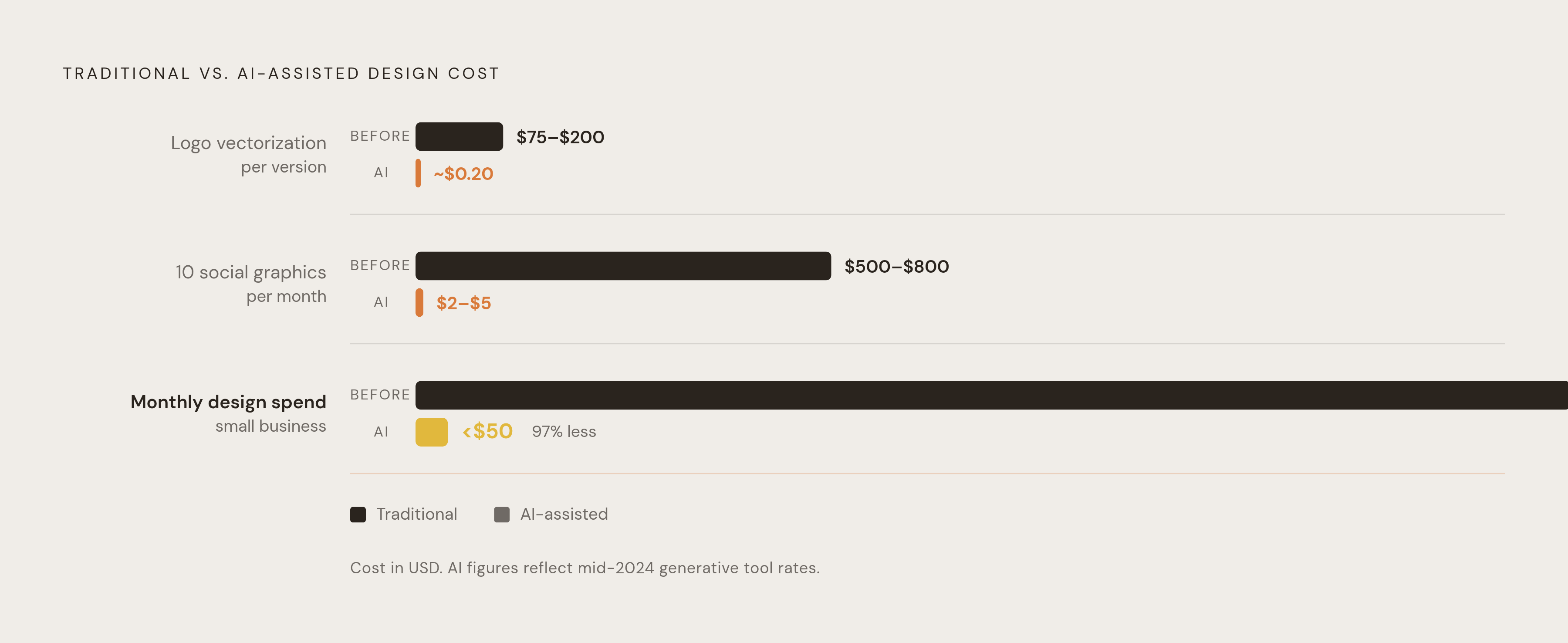
Numbers make this concrete faster than any argument does. Vectorizing a logo through a freelancer or agency runs $75 to $200 per version. The same job through AI tools costs about $0.20. Ten social graphics a month used to run $500 to $800. Now it's $2 to $5.
One documented case shows a small business spending $1,800 a month on design work switching to AI tools in January 2026 and bringing monthly design spend down to under $50.
The broader market rates hold up the same pattern when you zoom out. Freelancers charge $25 to $150 an hour. Agencies range from $5,000 to well over $100,000 depending on scope and specialty. Fuselab Creative's 2026 data on US mid-market agencies puts specialist-level hourly rates at $100 to $149, senior boutique work at $150 to $200, and highly specialized or compliance-heavy work at $200 to $300 an hour. Building an in-house team instead runs $150,000 to $400,000 a year for a small group.
Industry data shows SMBs spending $5,000 to $15,000 a month on agencies are cutting that spend by 60% to 80% once they move to AI-powered workflows. Sopro's 2025 AI in Marketing report puts the average ROI for teams using AI at 300%, combining revenue gains with cost savings.
None of this means judgment gets replaced. Strategic brand direction, major campaign concepts, and relationship-driven media buys still need someone with real experience calling the shots. What gets replaced is production throughput, the repetitive asset-making that used to eat agency retainers and freelancer invoices. The financial case for cutting that cost is settled. What's left to solve is how to build a system that captures the savings without wrecking the brand along the way.
Why speed without governance produces brand dilution at scale
7 out of 10 marketing teams using generative AI end up shipping visuals without maintaining brand consistency. Speed was the promise. Dilution is the risk nobody priced in.
The mechanism is simple enough. Someone hits "Generate" with no constraints in place, and the output looks fine, clean even, but it's brand-agnostic. It matches whatever the model was trained on rather than the company that's supposed to own it.
Compare that to how brand guidelines used to work. A traditional brand book is an 80-page PDF that nobody reads. An AI brand kit works differently: it's machine-readable. Logos, color palette, typography, voice, photo style, the do's and don'ts, all structured so a generative tool reads and applies them automatically on every single output. Type in something vague like "summer sale banner," and instead of a generic stock-image result, the tool produces something that already carries the brand's actual visual codes.
AI tools raise the floor. AI tools raise the floor while leaving the ceiling untouched. It's genuinely hard to produce something terrible with them now, but it's just as easy to produce something forgettable. What keeps output distinct and on-brand isn't the model but the system underneath: design tokens, locked template structures, usage rules, a defined voice that doesn't drift. Someone has to build that system, and it has to be someone who understands what the brand is actually for. That's the real hinge point for the rest of this piece: the designer's job shifts from producing assets to setting the constraints other people produce inside.
Three functional layers every in-house team needs
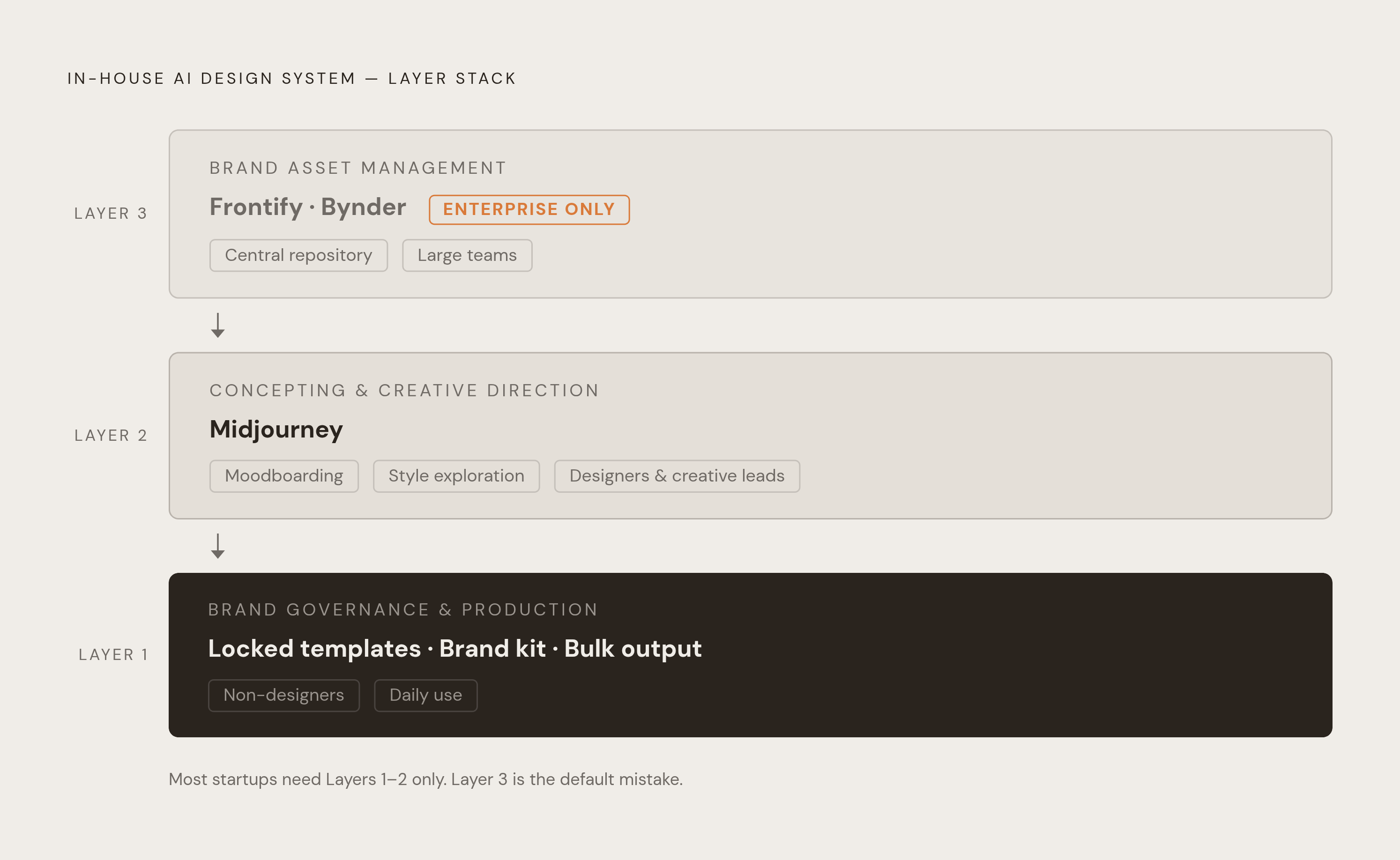
The most productive brand teams have stopped asking which single tool to buy. They're building stacks where each tool owns a distinct stage of the work. The tool isn't the strategy. The workflow is. And piling on more tools than the team needs creates its own drag, since context-switching between five half-used platforms costs more than the extra features are worth. Three layers cover what most teams actually need.
Layer 1: brand governance and production. This is where templates get built and locked, where the brand kit lives, and where non-designers, salespeople, marketers, operators, generate the bulk of daily output. Most of these people will never open a design tool built for professional designers, so the layer needs a real canvas, fully editable results, and templates locked tightly enough that someone can swap copy and images without breaking the underlying structure. Bulk production matters here too: feeding a spreadsheet in and getting a batch of campaign variations out.
Layer 2: concepting and creative direction. This layer belongs to designers and creative leads at the moodboard stage. Midjourney is still the benchmark for image quality when a team is exploring direction, and its --sref parameter locks a style reference across multiple generations, useful for keeping a campaign visually consistent while still testing ideas. Midjourney remains a poor fit for final production assets given the ongoing intellectual property concerns around its outputs. Use it to find the winning direction, then rebuild that direction inside the governed system. Stop using it once production starts.
Layer 3: brand asset management and source of truth. This layer only matters once a team is big enough that multiple people, or outside vendors, are touching brand assets regularly. Platforms like Frontify and Bynder, both now building in AI-assisted features, serve as the central repository for brand assets that teams and vendors pull from. They're priced for enterprise, usually custom quotes starting in the hundreds of dollars a month, and they're overkill for smaller teams. Smaller teams solve this same problem at the template and brand kit level instead.
Most startup and growth-stage marketing teams only need layers one and two. Layer three becomes necessary later. Teams need to know which layers actually apply to their size deliberately, not by default.
The production layer in practice: tools that let non-designers make on-brand assets
The handoff between designer and marketer is really the whole point of this layer. Designers build the locked templates. Marketers and operators fill in copy and imagery, generate variations, and produce assets in bulk, all without ever opening the design file underneath.
For a non-designer to actually get value here, the tool needs a few specific things. A real canvas gives control over individual elements, unlike a black box that spits out a flat image with no way to adjust it. Every part of the output needs to stay editable: text, layout, color, imagery, each adjustable on its own. The brand kit needs to be built into the tool so constraints get enforced automatically instead of relying on someone remembering the hex codes. And the output formats need to match where the assets are actually going: slide decks, social posts, PDFs, one-pagers, ad creative.
A few tools illustrate what this looks like in practice. Adobe's GenStudio for Performance Marketing lets teams generate on-brand campaign variations at scale, and it's built on Firefly, which trains on licensed Adobe Stock and public domain content, so enterprise users on qualifying plans get commercial safety on generated content. Adobe's own 2025 case studies show customers cutting the time spent producing Meta ad variations by 65%, delivering five times more content, reaching close to six times more people, and lifting sales by 16.6%.
AI-powered design platforms built specifically for go-to-market teams take a similar approach, pairing a locked design system with a fully editable canvas, but they aim it at the everyday output of salespeople, chiefs of staff, and operators: decks, one-pagers, social posts, PDFs, simple websites. Brand kits are built in from the start, everything stays editable on a real canvas, and the whole workflow assumes the person using it has never opened a professional design tool and never will. A 2025 report found small businesses using AI-powered design platforms cut the time spent on visual asset creation by around 60% compared to their old process.
The failure mode to watch for: picking a tool because it has the longest feature list, not because the sales team will actually open it. A tool with every capability imaginable is worthless if it sits unused while the team reverts to asking a freelancer for a quick banner.
How designers fit into an in-house AI stack, and what their job becomes
The Designer Fund's 2026 report, surveying more than 900 designers across over 60 countries, found 91% now use AI for design tasks weekly, up sharply from 54% the year before, and 75% use it daily. That's the AI in Design 2026 report, produced with Foundation Capital.
The role itself is shifting underneath that adoption number. 65% of designers report taking on more product and engineering responsibility than before, and design leaders in the same report describe designers increasingly as orchestrators rather than executors. Half of design leaders now weigh AI fluency more heavily when hiring.
What that means in practice: a single designer now covers ground that used to take a team a full quarter. AI handles the execution, freeing the designer up for concept direction, visual storytelling, art direction, and the brand strategy work that actually needs a human making judgment calls.
Inside an AI stack specifically, a designer's job breaks down into a few concrete responsibilities. Building the template architecture that non-designers operate inside every day. Defining the design tokens, the locked components, the usage rules that the AI tools then enforce automatically. Setting up the brand kit so it captures the actual intent behind the brand, beyond just a swatch of approved colors. And making the taste calls: looking at five AI-generated directions and knowing which one is worth building out and which one is forgettable.
A company may not need a full design team anymore. It needs at least one person who understands what the brand stands for and can translate that understanding into rules a machine can follow. AI fluency has become a hiring bar for that role. Half of design leaders say so directly.
There's a useful parallel in accessibility work. Tools like Stark now catch contrast problems, flag type that's too small to read, and spot touch targets that are sized wrong, continuously, throughout the design process rather than in one audit at the end. That kind of ongoing quality check used to require agency-level resources to run properly. Now it happens automatically at every stage.
The workflow redesign that separates teams that capture value from those that don't
McKinsey's finding bears repeating here: high performers are almost three times more likely to rebuild their workflows around AI, not simply add a tool to the workflow that already existed. That distinction is where most of the value is measured, or where it's absent.
The bigger shift happening in 2026 is the move from AI as a writing or generating tool toward AI as a workflow system, one that connects multiple apps, makes decisions, and completes multi-step tasks with minimal hand-holding. Gartner expects 40% of enterprise applications to include task-specific AI agents by the end of 2026.
A workable version of this for go-to-market asset production is something like the following.
A sales rep or marketer opens with a brief: audience, format, message, deadline. A designer or creative lead then sets the visual direction, often using Midjourney to explore options before translating the winning concept into the governed template system. From there, the marketer or operator takes over inside the production layer, filling in copy, swapping images, generating format variations, with the brand kit enforcing consistency without anyone having to check a style guide by hand. A quick review stage follows, spot-checking against brand standards while an accessibility audit runs in the background automatically. Then the assets export straight into the formats each channel actually needs.
What disappears in that sequence is the whole apparatus that used to sit between an idea and a finished asset, including the agency handoff, the week-long revision cycle, the account manager relaying feedback back and forth, and the two-week wait for a report on work that's already stale by the time it lands.
Sources
- Top 12 AI Design Agencies & Studios for Creative Innovation in 2026
- AI in Design 2026: Best Tools, Real Workflows, What's Next | Devlin Peck
- 13 Best AI Tools for Agencies in 2026 (Save 10+ Hours Per Week)
- How to Replace Your Marketing Agency with AI in 2026: A Complete Playbook | Enrich Labs
- awesomic.com
- flatlineagency.com
- designerfund.com